Cluster architecture
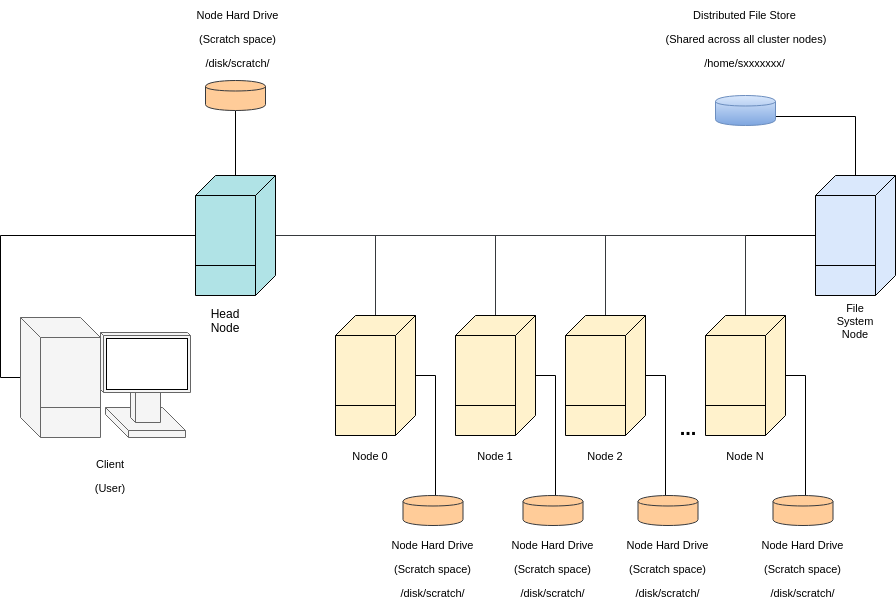
To learn more, start at the GPU and Cluster Computing page.
Thanks to Antreas Antoniou for the diagram.

To learn more, start at the GPU and Cluster Computing page.
Thanks to Antreas Antoniou for the diagram.
The Teaching cluster is used to support teaching courses, especially MSc courses and the Machine Learning Practical. It has now been merged into the Informatics Compute Facility (ICF) as the Teaching partition.
The Teaching partition has 106 GPUs in 14 servers. This includes 8x NVIDIA RTX A6000 48GB GPUs (landonia11), 90x NVIDIA RTX 2080 Ti 11GB (damnii07-12,landonias,opencast), and 8x H200 141GB partitioned into smaller virtual GPUs (saxa). Please note that the configuration may change. Check the MOTD and the blog for details.
Some of the School's GPU compute clusters use the Slurm job scheduler.
Slurm matches computing jobs with computing resources. It tries to ensure that the resources are allocated fairly and that they are used efficiently. To ensure this it has complex prioritisation rules.
Slurm is widely used on supercomputers, so there are lots of guides which explain how to use it:
This page has been moved to computing.help.inf.ed.ac.uk/teaching-cluster.
For a list of GPU facilities see the GPU and cluster computing page.
GPGPU is general purpose computing using graphics processing units.
The Charles cluster is for Data Science CDT students.
This cluster has several types of computer node.
cdtcluster. To use the "charles" GPU nodes, first ssh cdtcluster then use Slurm.
Here's how to use a cluster without breaking it:
IBM Storage Scale, previously called IBM Spectrum Scale, previously called GPFS, is a proprietary parallel filesystem, developed originally for handling large multimedia files on a cluster of networked computers.
For some years the School maintained a small (~5TB) GPFS scratch filesystem for researchers. However, the free-to-use version could not be used on SL7 at the time (it's no longer possible to obtain driver support) so we discontinued the service.
If you are interested in using IBM Storage Scale, and you have very deep pockets, then please let us know.
This page has been incorporated into the GPU and cluster computing pages.
For those buying servers, we strongly recommend you consider virtualisation when provisioning new services. It saves on the proliferation of hardware, so is environmentally friendly. Depending on application our desktops can support a number of virtual hosts without any significant overhead. Each could be running services that traditionally would have been run on dedicated physical hardware. Running a virtual service on your own DICE desktop can also help to get a service going without buying new hardware.